Settings
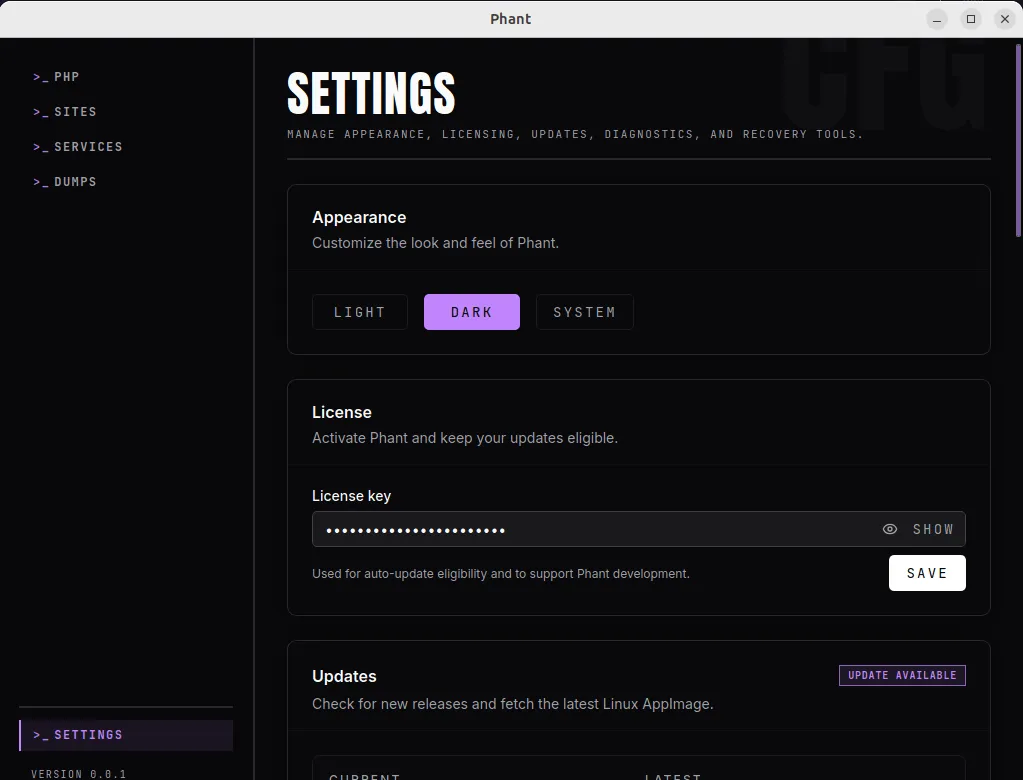
Use the Settings page to manage app behavior, license information, updates, diagnostics, and Valet-related recovery tools.
This page combines several operational areas that help you maintain Phant after initial setup.
What users can configure
Section titled “What users can configure”The current Settings page includes:
- appearance
- license key
- updates
- diagnostics
- Valet verification and remediation
Appearance
Section titled “Appearance”Use Appearance to switch between:
- Light
- Dark
- System
This changes how Phant looks, but it does not affect your PHP or environment setup.
License
Section titled “License”Use License to save or update your Phant license key.
The current documented purpose of the license key is:
- auto-update eligibility
- support for ongoing Phant development
To update it:
- open
Settings - go to
License - enter or edit the key
- click
Save
Updates
Section titled “Updates”Use Updates to manage Linux AppImage updates from inside Phant.
The page can show:
- current version
- latest version
- update status
- release notes when available
With a valid license, Phant can check for updates, download the latest Linux AppImage update, and install it from the app flow.
Typical update workflow:
- open
Settings - go to
Updates - click
Check for updates - if an update is available, click
Download - when ready, click
Install & restart
Diagnostics
Section titled “Diagnostics”Use Diagnostics when you want to inspect the local PHP CLI setup and manage hook installation.
This area is useful for:
- checking whether PHP was found
- reviewing the detected PHP version
- managing CLI hook setup
If dump capture is not working from CLI commands, this is one of the first places to check.
The Valet section inside Settings gives you embedded access to verification and remediation tools.
Use this when:
- you want to review Valet status without leaving
Settings - you need to refresh the current verification state
- you need to apply remediation for PHP-FPM hook wiring
This overlaps with the dedicated Valet workflow covered in Sites and Valet.
Stored data
Section titled “Stored data”Phant stores some app data locally.
One important documented example is the app settings file used for persisted settings such as the license key:
~/.config/phant/settings.json
Recommended workflow
Section titled “Recommended workflow”Use Settings for maintenance tasks rather than constant day-to-day navigation.
Typical workflow:
- update your license key if needed
- check for updates occasionally
- review diagnostics when CLI behavior changes
- review Valet verification when HTTP dump capture stops working
- adjust appearance whenever you prefer
Troubleshooting
Section titled “Troubleshooting”My license key was entered but updates still do not work
Section titled “My license key was entered but updates still do not work”Check whether:
- the key was saved successfully
- the app is showing the expected current version
- the update section reports an eligibility or download error
The update was downloaded but not installed
Section titled “The update was downloaded but not installed”Check whether:
- the update file path is shown correctly
- the install action returned an error
- a restart was blocked by the environment
CLI dump capture is failing
Section titled “CLI dump capture is failing”Check whether:
- diagnostics still detect PHP correctly
- the CLI hook is enabled
- the dumps Runtime panel shows the collector as healthy
HTTP dump capture is failing
Section titled “HTTP dump capture is failing”Check whether:
- the embedded Valet section shows recommendations
- PHP-FPM remediation is still needed
- the related PHP-FPM service is active