Sites and Valet
Use this guide to understand how Phant works with Valet Linux for local sites, linked domains, parked directories, and PHP-FPM verification.
Phant does not install Valet Linux for you. If you want to use the Sites and Valet workflows fully, make sure Valet Linux is already installed and working on your machine.
Valet Linux project:
What this guide covers
Section titled “What this guide covers”- site discovery
- local domains
- Valet verification
- remediation flow when configuration is incomplete
Open the relevant pages
Section titled “Open the relevant pages”Phant uses two related areas for this workflow:
SitesValet
Use Sites for discovery and inspection.
Use Valet for verification and remediation.
Use the Sites page
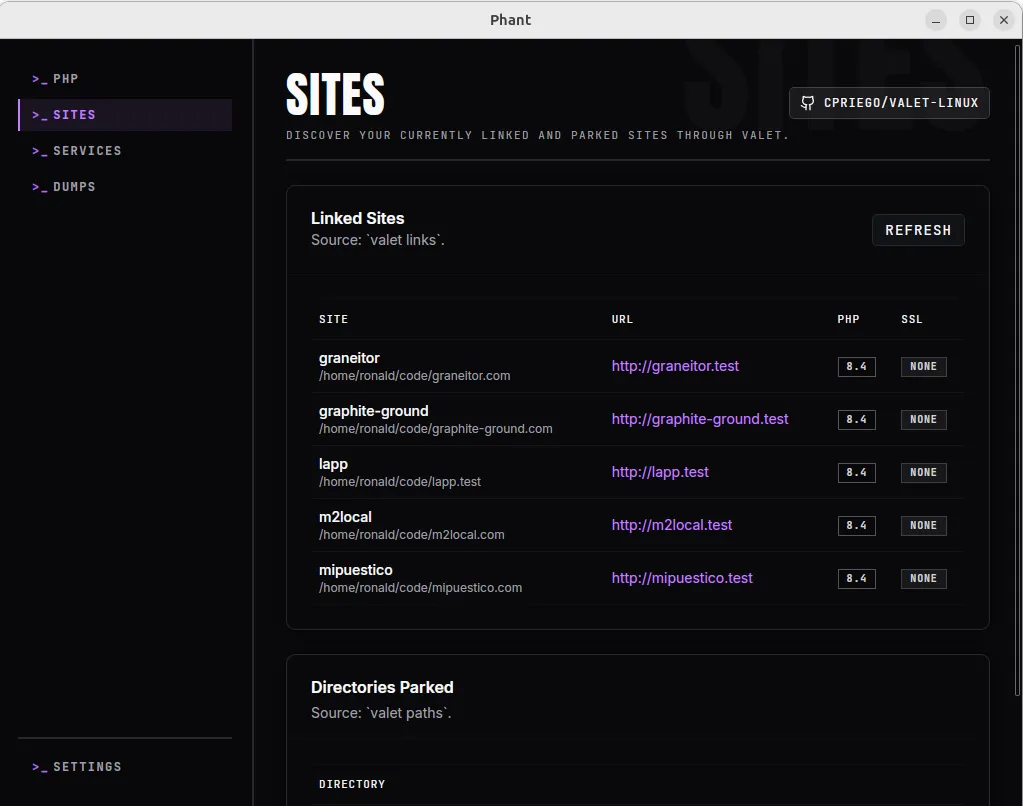
Section titled “Use the Sites page”The Sites page helps you inspect what Valet Linux already knows about your machine.
What you can see
Section titled “What you can see”In Sites, Phant can show:
- linked sites
- local URLs
- detected PHP version per site when available
- SSL status
- parked directories
Inspect linked sites
Section titled “Inspect linked sites”Use Linked Sites to review the site definitions Phant reads from Valet.
Each row can include:
- site name
- project path
- local URL
- PHP version
- SSL status
This is useful when you want to confirm that a project is already linked correctly and that its local domain matches your expectation.
Inspect parked directories
Section titled “Inspect parked directories”Use Directories Parked to review the folders Valet watches for parked projects.
This is useful when:
- you expect a project directory to resolve automatically
- you want to confirm that a development folder is being watched by Valet
Use the Valet page
Section titled “Use the Valet page”The Valet page helps you verify whether Valet Linux and PHP-FPM are wired correctly for Phant features such as HTTP dump capture.
What Phant verifies
Section titled “What Phant verifies”Phant checks details such as:
- whether Valet is detected in your
PATH - the service manager in use
- CLI
conf.dpath - current CLI
auto_prepend_file - expected prepend path used by Phant
- discovered PHP-FPM services
- recommendations based on the current state
Refresh verification
Section titled “Refresh verification”Use Refresh when:
- you changed your Valet setup outside Phant
- you installed or switched PHP-FPM versions
- you want a fresh verification snapshot
Apply remediation
Section titled “Apply remediation”Use Apply Remediation when Phant reports that a detected PHP-FPM service is not wired to the expected prepend script.
Before applying remediation:
- review the verification details
- enable the confirmation checkbox
- click
Apply Remediation
What this is intended to do:
- write or update the required
99-phant.inifile for detected PHP-FPM services - attempt related service restarts when needed
Read recommendations
Section titled “Read recommendations”Always review the recommendations list before making changes.
This helps you understand whether the problem is:
- missing Valet installation
- missing or mismatched prepend configuration
- inactive PHP-FPM services
- a custom environment that needs manual verification
Typical workflow
Section titled “Typical workflow”- Open
Sitesand confirm the project appears as expected. - Check the local URL, PHP version, and SSL state.
- Review parked directories if the project should resolve automatically.
- Open
Valetand runRefresh. - Review recommendations.
- Apply remediation only if Phant shows that PHP-FPM hook configuration is incomplete.
- Re-test the local site in the browser.
Important notes
Section titled “Important notes”- Phant works with your existing Valet Linux setup.
- The
Sitesview is for discovery and inspection, not for creating or linking sites directly inside Phant. - The
Valetview is where verification and remediation happen. - HTTP dump capture depends on correct PHP-FPM wiring, not only on CLI setup.
Troubleshooting
Section titled “Troubleshooting”My site does not appear in Phant
Section titled “My site does not appear in Phant”Check whether:
- Valet Linux is installed and available in your
PATH - the project is actually linked or parked in Valet
- a refresh returns warnings or an error
The site exists, but the PHP information looks wrong
Section titled “The site exists, but the PHP information looks wrong”Check whether:
- the displayed site runtime matches your current Valet configuration
- you recently switched PHP versions and need to verify Valet again
HTTP dump capture is not working
Section titled “HTTP dump capture is not working”Check whether:
- the CLI hook is installed
- the Valet page shows PHP-FPM hook mismatches
- the detected PHP-FPM service is active
- the recommendations list suggests a manual follow-up command